Claude meets Obsidian
Five step personal agent setup

Hi everyone! Haven’t posted here in a few weeks…I got distracted with the Twitter game. But I guess that’s part of the creative process. Sometimes we overcorrect and just have to find the balance again.
With that being said, I did have a tweet that went pretty viral and tons of people found it helpful. If you’ve been reading most of my posts from the last few months, then it’s nothing new but I thought I’d share it with all of you just in case!
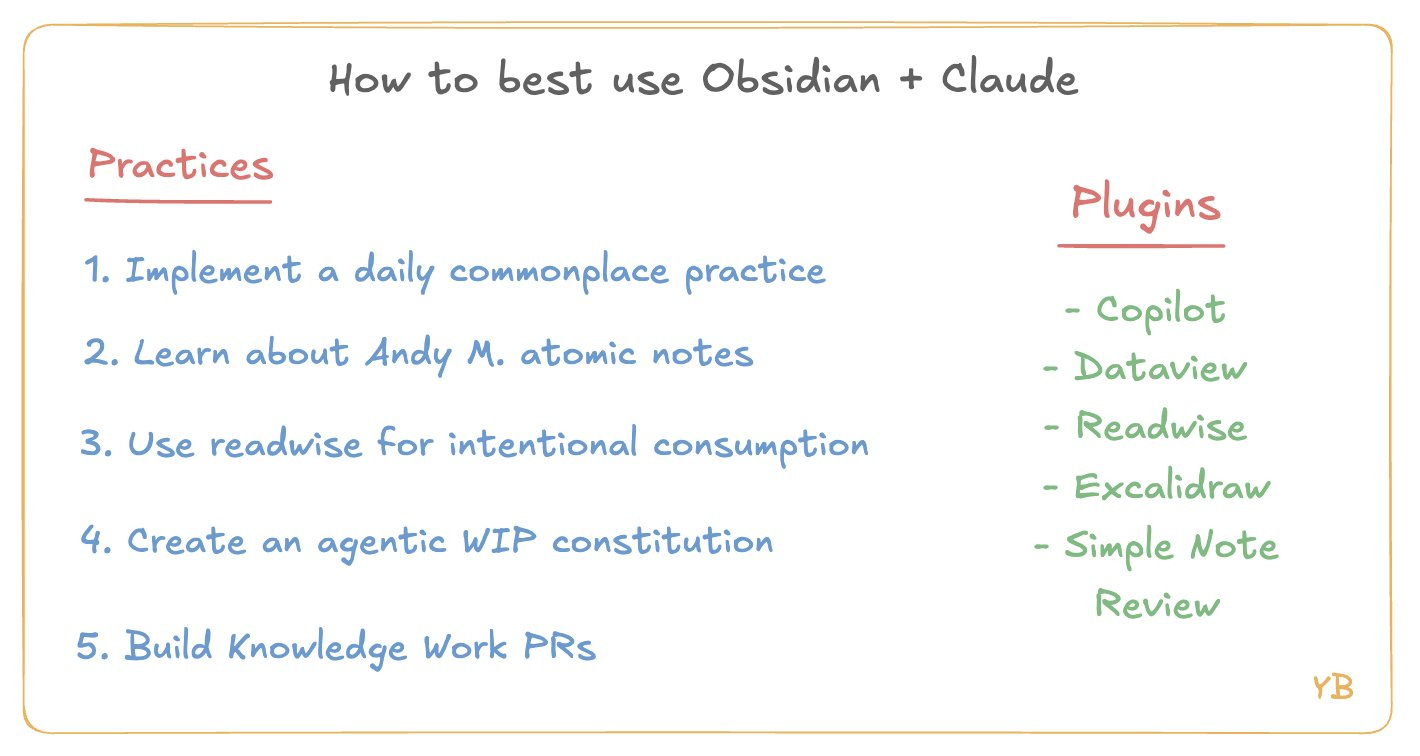
Here’s the tl;dr image I made for it.
Not surprised that everyone is finding the Claude-Obsidian setup mind blowing.
I’ve been using this set up for the last few months and it’s totally changed my daily habits and how I think about using AI.
Some tips:
1. You HAVE TO build a daily commonplace practice.
The more observations, epiphanies, thoughts, and questions you can jot down, the more context your agents will have on how you think, make decisions, what matters to you, etc.
These notes don’t need to be clean or structured. Optimize for whatever lets you just get the thing down on paper. You’re doing it right if your notes are all over the place...that’s how our brain works.
My rec is to voice transcribe as much as you can because it’s easier to say more. Say your ifs, buts, and ums. They’re actually more helpful in context, you’re letting your agent know what you are and aren’t sure about.
The key thing to note about Andrej Karpathy’s LLM wiki base is that it’s fantastic for research projects - where it makes sense to have synthetically produced artifacts. But if you’re trying to use “Claude + Obsidian” as a personal thinking tool, then you can’t outsource your own life experiences to AI. That personal context you add is quite literally what makes the tool useful for you.
After doing this for 9 months, I can say for sure the context compounds. If you can just keep the habit going for a few weeks, you’ll start noticing patterns that surprise you.
2. Go learn about Andy Matuschak’s atomic note taking practice.
My big takeaway here is that thinking in atomic notes makes it easier to pull contexts from different parts of your life that you would normally modularize.
The notes aren’t facts/names/dates but rather concepts. I love to think about them like API endpoints you call when trying to solve through problems in your professional or personal life.
Remember, as Paul Graham says “writing is thinking”. Just write these notes for yourself in a way that makes sense to YOU. You’ll start changing how you perceive your own thoughts and thinking style.
Eventually, you’ll get to a point where you have so many atomic notes that you dictate a train of thought to Claude and it’ll go through your vault and pull your own thoughts from the past to help you out...it’s a magical experience.
3. Connect Readwise or Obsidian Web Clipper to build an intentional reading habit.
Since starting this setup, I’ve realized how much of my content consumption in the past was cope. I thought I was being productive by listening to podcasts all the time or scrolling on Substack instead of X.
I now am *extremely intentional* about the content I read and how I read it. @phokarlsson has a post on this called “Structure your milieu”. Ask yourself, who gets access to my brain? Read their writing religiously and block everyone else out.
Your time scrolling should equate to searching for potential reads you want to add to the backlog, that’s it. And your “consumption time” should be you in Reader highlighting and taking notes obsessively. Even a simple 5 min Substack read should be treated as an opportunity to create new atomic notes, connect previous ideas, etc.
The Readwise Obsidian plugin then lets you pull all your highlights that you can then connect to other parts of your vaults in meaningful ways. Remember, the more you read with intention, the more context you’ll have to add to your “second brain”. You can’t automate that part.
4. Build an agentic constitution
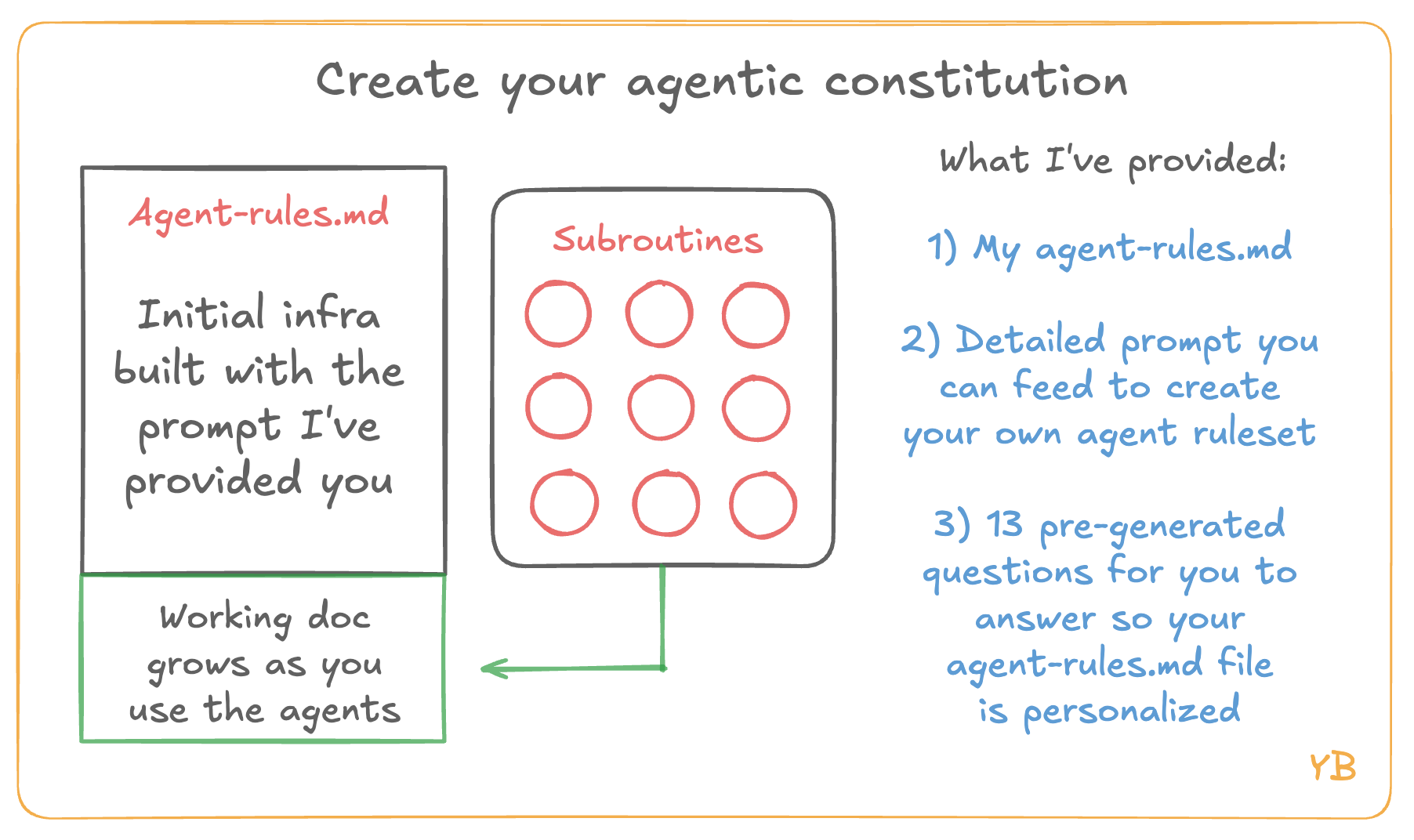
This is effectively the portal between your Obsidian and Claude. I have a detailed post on how I did this + a template you can feed to your own AI of choice to build for yourself (see in reply below).
But this file is you letting your agent know all the context it needs to know about you at a high level: who you are, your big question, how you like to work, your main goals, current problems, context on your team, and so on.
Anytime I have the agents do work for me, the first step is to go read the constitution so it acts in alignment with what I’m looking for at this stage in my life.
Key note here is that it’s a constant WIP doc. I’m almost updating this weekly so that Claude knows what’s changing in terms of focus and prioritization. The more you think about this doc like you’re updating your team, the more useful it will be.
5. Create Knowledge Work PRs
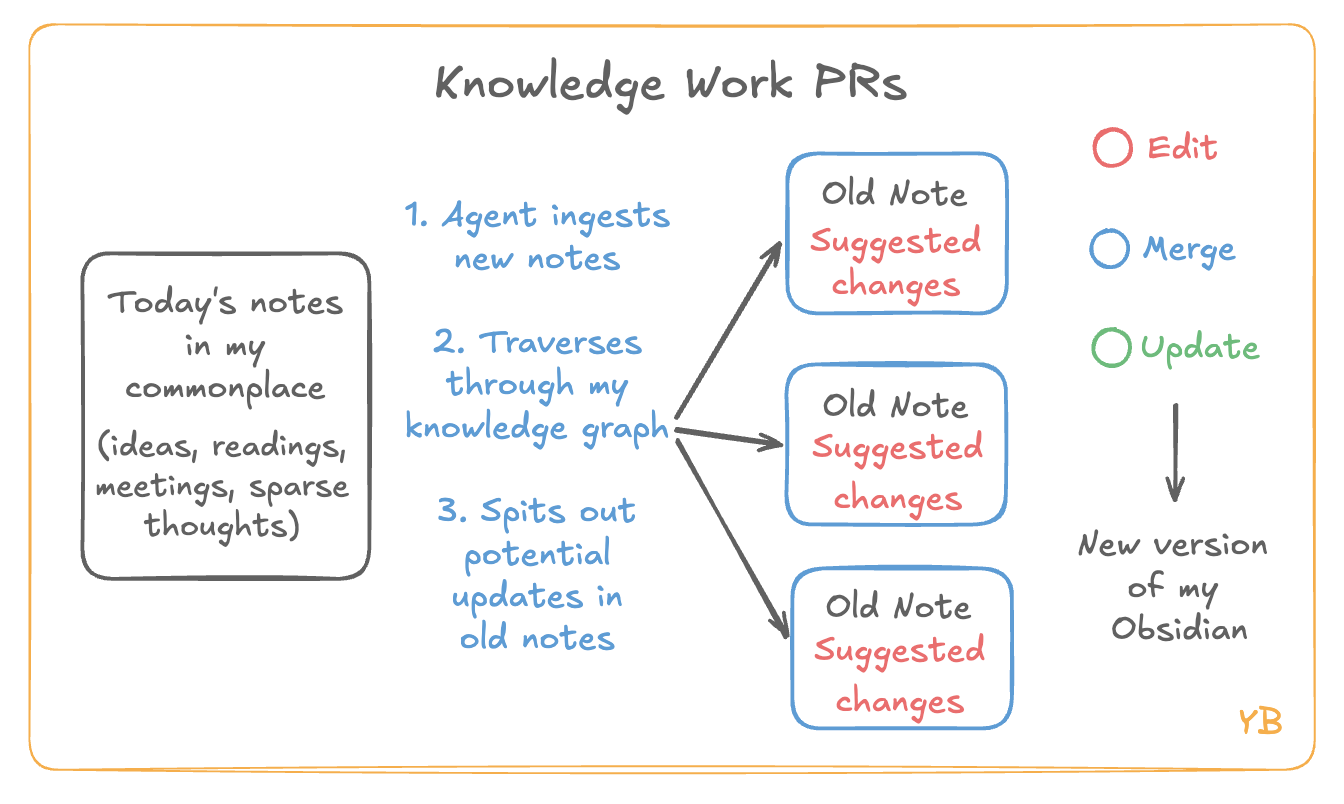
This is the coolest part in terms of Claude integration but it only works if you have meaningfully spent time on the steps above.
I’ve slowly been adding subroutines to my vault. Call them skills or agents it doesn’t matter. To me, they’re equivalent of writing methods in a code repo. Each subroutine has a specific set of instructions on what to do.
For example, one of mine is called “Tend the Vault”. It’s job is to check all my daily commonplace entries since I last triggered it, notice any key threads and insights, tell me which atomic notes I need to update, and create a draft of what to add.
Then I’ll go through a 5 minute voice session where it takes me through edits one by one and I’ll approve, tweak, or reject them. Once we go through the changes, it will go and updates all the respective md files.
I call this section “Knowledge Work PRs” because that’s exactly what they are. You run your subroutines, the agents go do the work, and then you sit down and just like a manager go through all the PRs and decide what gets to go through production.